【原创】微信小程序api接口https要求TLS大于等于1.2
全文约 493 字预计阅读 2 分钟
今天使用微信小程序调用一个接口发现出现以下错误提示。
VM8 asdebug.js:1 https://netpc.com.cn 对应的服务器 TLS 为 TLS 1.0 ,小程序要求的 TLS 版本必须大于等于 1.2 。控制台输入 showRequestInfo() 可以获取更详细信息。
搜索发现TLS1.2至少openssl需要1.0.2版本,上服务器一看发现版本低了。
[root@netpc.com.cn nginx-1.10.2]# nginx -V
nginx version: nginx/1.10.2
built by gcc 4.1.2 20080704 (Red Hat 4.1.2-54)
built with OpenSSL 0.9.8e-fips-rhel5 01 Jul 2008
[root@netpc.com.cn ~]# openssl version -a
升级更新openssl
wget https://www.openssl.org/source/openssl-1.0.2q.tar.gz
tar zxvf openssl-1.0.2q.tar.gz
cd openssl-1.0.2q
./config
make
make install
安装后发现版本没变,执行下面的代码更新
/usr/local/ssl/bin/openssl -version
/usr/local/ssl/bin/openssl version
mv /usr/bin/openssl /usr/bin/openssl.bak
mv /usr/include/openssl /usr/include/openssl.bak
ln -s /usr/local/ssl/bin/openssl /usr/bin/openssl
ln -s /usr/local/ssl/include/openssl /usr/include/openssl
echo “/usr/local/ssl/lib” >> /etc/ld.so.conf
ldconfig -v
这样就发现变过来了,可是还是不行,执行nginx -V查看还是0.9.8e,看来需要重新编译下nginx,编译新的源码是如果出错,可以指定--with-openssl这个参数到新的版本源码目录上。
./configure --user=www --group=www --prefix=/usr/local/nginx --with-http_stub_status_module --with-http_ssl_module --with-http_gzip_static_module --with-ipv6 --add-module=/usr/local/src/nginx-http-concat/ --add-module=/usr/local/src/ngx_cache_purge-2.3 --with-openssl=/usr/local/src/openssl-1.0.2q
最后安装成功,再查看下版本上去了。
[root@netpc.com.cn ~]# nginx -V
nginx version: nginx/1.18.0
built by gcc 4.1.2 20080704 (Red Hat 4.1.2-55)
built with OpenSSL 1.0.2q 20 Nov 2018
可以用以下命令检测是否支持
openssl s_client -connect www.netpc.com.cn:443 -tls1
openssl s_client -connect www.netpc.com.cn:443 -tls1_1
openssl s_client -connect www.netpc.com.cn:443 -tls1_2
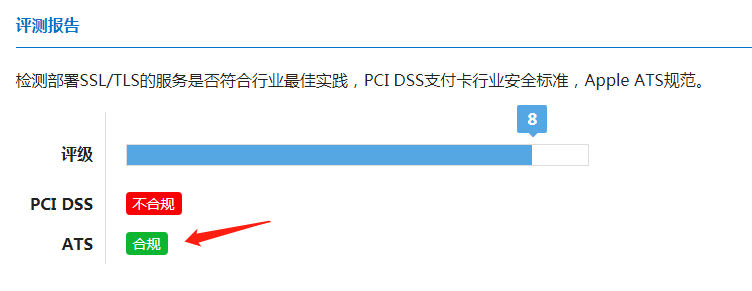
找个网站检测下也可以,符合ATS就支持TLS1.2
【原创】微信小程序api接口https要求TLS大于等于1.2
评论 0 条
暂无评论,来说点什么吧。